 Booklet Imposer
8-Page Booklet Page Order
Last updated:
The outer sheet is the cover wrap
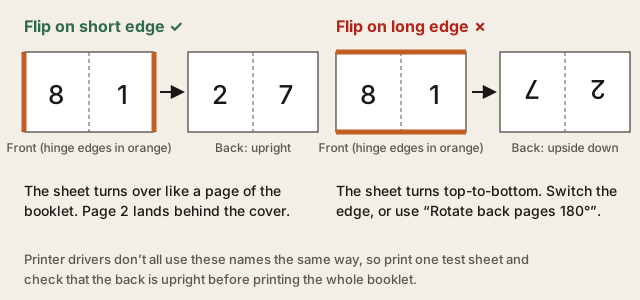
An 8-page booklet is two sheets. Sheet 0, the outermost, prints 8 on the left and 1 on the right. Turn it over like a page and you get 2 on the left and 7 on the right. Sheet 1 prints 6|3 then 4|5. Fold both sheets together and the reader order is 1 through 8.

| Sheet | Front L|R | Back L|R |
|---|---|---|
| 0 outer | 8 | 1 | 2 | 7 |
| 1 inner | 6 | 3 | 4 | 5 |
Load the free 8-page sample in the PDF booklet maker to see the same numbers on colored pages. Pads are not needed here because 8 is already a multiple of 4. If you started from 5, 6, or 7 pages, blanks would appear at the end and the outer left slot would still be N, not your last authored page.
Printing this file as-is, without imposition, would put 1 beside 2. That is a calendar, not a booklet. After export, PDF page 1 is the outer Front and PDF page 2 is the outer Back. Keep the stack in that order. Scale 100%. Flip on short edge. Printer booklet mode off. Fold once. Staple the fold. If the back is upside down, the flip edge is wrong or you need Rotate back pages 180°.
Gutter and creep are optional at this length. A 3 mm gutter (Zine default) is enough if type sits near the stitch. Creep is usually zero for two sheets of copy paper. Bleed stays 0 unless your artwork already includes extra image beyond the page edge. The tool does not look for crop marks in your file.
Questions
Why must the page count be a multiple of 4?
Each sheet holds four reader slots. Saddle-stitch signatures only close when N is a multiple of four.
What if my source has fewer pages?
Blank pages are padded at the end until N is a multiple of four. Existing pages keep their numbers; pads show as Blank in Sheets view.