 Booklet Imposer
Booklet Guides
Last updated:
Start here
These guides cover the whole job of turning a PDF into a stapled booklet on a home or office printer: how the pages are arranged, how to set up the printer, and how to fold and staple the result. They are written for people making zines, programs, handouts, and small booklets, not for commercial print shops.
You don’t need to read everything. If this is your first booklet, the five pages below, in this order, take you from “what is this?” to a finished copy. Keep the others for when you run into a specific problem.
- What is saddle stitch? The binding itself, and when it is the right choice.
- How to make a booklet from a PDF. The full walk-through, from preparing your file to exporting it.
- How to print a booklet. Materials, printer settings, and the order to do things in.
- Print a booklet double-sided. Getting the back of each sheet the right way up.
- Paper, folding, and stapling. Finishing the booklet by hand.
Understand how booklet pages are arranged
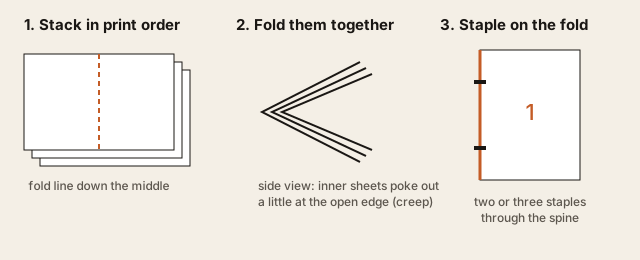
- What is saddle stitch? How nested, folded, and stapled sheets make a booklet, and why the pages can’t simply be printed in order.
- How to impose a PDF for saddle stitch. The page-order rules, why the count must be a multiple of four, and worked 8- and 16-page layouts.
- 8-page booklet page order. The smallest common booklet, sheet by sheet, with a diagram and a sample PDF you can try.
- 16-page booklet imposition. Four nested sheets, where the center spread lands, and when creep starts to matter.
Make the booklet file
- How to make a booklet from a PDF. Step-by-step instructions for the tool, plus how to check the exported file before printing.
- Saddle stitch imposition. The tool with a detailed explanation of each option and a test for your printer’s duplex setting.
- Saddle stitch page order calculator. See which page goes where on every sheet of your own booklet.
- Zine printing imposition. Settings and tips for photocopied and home-printed zines, including half-letter and mini-zine sizes.
Print, fold, and staple
- How to print a booklet. What you need, how to export, printer settings, and the most common mistakes.
- Print a booklet double-sided from a PDF. Short-edge versus long-edge flip explained with a diagram, plus printing without an automatic duplex printer.
- Booklet printing guide: paper, folding, and stapling. Choosing paper, folding cleanly, stapling, and optional trimming.
Margins for thicker booklets
Thin booklets rarely need any of this. Once you have more than a few sheets, or you are using heavier paper, these pages help keep text out of the staples and margins even.
- Gutter vs creep. The difference between space at the fold and the inward shift for inner sheets, with a diagram.
- Booklet creep calculator. Estimate how much creep your booklet needs from the paper weight and sheet count.
- PDF booklet creep compensation. Apply a creep value, then check and fine-tune it with a printed proof.
Quick reference
- FAQ. Short answers to common questions, and a checklist for when the printout doesn’t match the preview.
- Glossary. Plain explanations of signature, creep, gutter, bleed, duplex, and other printing terms.
Em português: criar livreto PDF e como imprimir PDF em livreto.
How these guides are kept up to date
Each guide shows the date it was last updated. I revise them when the tool changes, and when readers write in about something that was unclear or didn’t work on their printer. If a guide didn’t match what happened with yours, please let me know.