 Booklet Imposer
Print a Booklet Double Sided from PDF
Last updated:
Arrange the pages first, then print double-sided
To print a booklet double-sided from a PDF, the pages have to be arranged into booklet order before you print. A normal PDF printed on both sides is just a stack of pages, not a booklet. After Booklet Imposer exports your file, each page of the new PDF is one side of a sheet: the front of the outer sheet, then its back, then the next sheet in, and so on.
In the printer dialog choose double-sided, Flip on short edge, 100% / actual size, and make sure the printer’s own booklet mode is off. Then print the downloaded PDF like any other document.
Avoid “fit to page”: it shrinks the sheet slightly and the pages no longer line up with the fold. Print and fold one test sheet before the full run. Colors stay as they are in your PDF; if you want a cheaper grayscale proof, pick grayscale in the print dialog.
Short-edge vs long-edge flip
The booklet sheet is landscape, with two pages side by side and the fold down the middle. The flip setting decides how the printer turns the sheet over before printing the back, and that decides whether the back comes out the right way up.
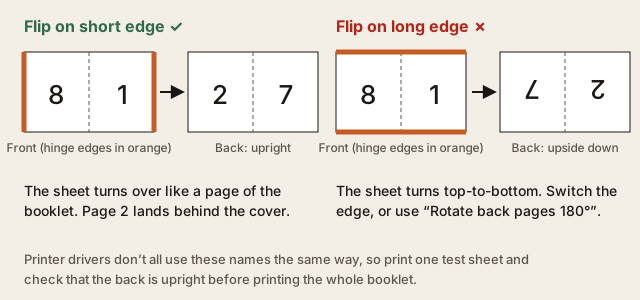
| Flip on short edge | Flip on long edge | |
|---|---|---|
| How the sheet turns | Side to side, like turning a page of the booklet. | Top to bottom, like flipping a wall calendar. |
| Result on a booklet sheet | Back is upright; page 2 sits behind the cover. | Back is upside down relative to the front. |
| When to use | The normal choice for booklets made with this tool. | Only if your test sheet shows that your driver labels the edges the other way round. |
If your printer can only do one kind of flip and the back still comes out upside down, turn on Rotate back pages 180° in the tool, export again, and print with the same setting.
Troubleshooting upside-down backs
- Check that you printed the exported booklet PDF, not your original document.
- Set the flip to short edge. If the back is still upside down, try long edge, or enable Rotate back pages 180° and export again.
- Print at 100% / actual size. “Fit to page” shrinks the sheet and can hide other problems.
- Turn printer booklet mode off. It rearranges the pages a second time and scrambles the backs.
- Test one outer sheet: the front should show the last page next to page 1, and the back should show page 2 next to the second-to-last page. Fold it before changing any other setting.
Printing without an automatic duplex printer
If your printer can’t print both sides automatically, you can feed the sheets through twice. In the print dialog, print only the odd pages of the exported PDF (these are the fronts of each sheet). Then put the printed stack back in the paper tray and print the even pages (the backs).
How to reload the stack depends on your printer: which way up the paper goes, and whether the sheets come out face up or face down. Do the first attempt with a single sheet, draw an arrow on it pointing to the top and the front before it goes back in, and note what works. Some print dialogs have a “reverse order” option, which helps if the stack comes out in the opposite order. Once one sheet comes out right, the same routine works for the whole booklet.
Questions
Why flip on the short edge?
A booklet sheet is landscape with two pages side by side, and the fold runs parallel to the short edges. Turning the sheet over around its short edge is the same movement as turning a page of the finished booklet, so the back comes out upright. A long-edge flip turns the sheet top to bottom and prints the back upside down.
My printer’s wording is different. How do I know which setting to use?
Print one sheet with a mark at the top of the front, turn it over like a book page, and check that the back is upright. Keep whichever setting passes; driver labels are not always consistent.
Can I use the printer’s booklet mode instead?
Not with this file. The export is already in booklet order, and printer booklet mode would rearrange it again. Leave booklet mode off and print the exported PDF double-sided at 100% scale.