 Booklet Imposer
Zine Printing Imposition
Last updated:
A zine is a short saddle-stitched book
Zine printing imposition is the same geometry as any other saddle-stitch booklet: 2-up sheets, one signature, pad to a multiple of four. The difference is cultural, not mathematical—short runs, photocopiers, colored paper, a stapler on a kitchen table. The Zine default preset sets a 3 mm gutter and no creep, which is enough for a thin photocopied booklet.
Your file stays on your computer. The tool doesn’t upload your PDF, and it doesn’t merge several PDFs into one. Drop the export from your layout app, preview Sheets, export, print duplex. If your zine is 7 pages, you will see three blanks at the end. That is correct. Do not delete a blank you placed on purpose in the source; source blanks count as reader pages.
Half-letter / mini-zine paper
A typical half-letter or mini-zine starts as portrait pages. Auto paper makes a landscape sheet two pages wide from page 1’s size. If that sheet is larger than Letter landscape, pick Letter (or A4) landscape so the printer can feed it—do not scale in the driver.
Do not double-impose. Export once here, then print duplex with booklet mode off. Imposing in the layout app and again in this tool (or in the printer) will scramble the zine.
Page 1 is already the cover in the formula. Bleed is a number you type; the tool does not find printer marks. Flip on short edge. Fold the stack as one signature. A long-reach stapler is enough.
Duplex test sheet — long edge or short edge?
A duplex test takes less time than refolding a whole zine. Use one imposed sheet first, with booklet mode off, Actual size/100% selected, and the printer’s duplex setting enabled.
- Put a small
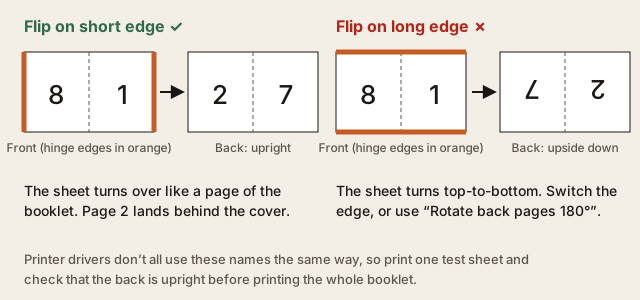
TOPmark near the top edge of the PDF or write it on the first test sheet. Print one sheet only. - Because a booklet sheet is landscape with two pages side by side, start with Flip on short edge. This is the usual setting for the landscape sheet made by Booklet Imposer.
- Turn the sheet over using the marked top edge. If the reverse side is upright and the two page tops agree, keep that setting.
- If the reverse is upside down, repeat the one-sheet test with Flip on long edge. Keep the setting that leaves the reverse upright; printer-driver labels can vary.
- Once the test passes, print the complete range with the same paper size and scale. Do not enable the printer’s own booklet or brochure mode, or the file will be imposed twice.
Next steps
New to the bind? Read what is saddle stitch, then how to impose a PDF for saddle stitch. For a concrete sheet table, see the 8-page booklet example. When you print, follow print booklet double sided from PDF.
Zine printing FAQ
Why did the tool add blank pages to my zine?
A saddle-stitched sheet has four reader-page slots. If the document ends at a page count that is not divisible by four, the remaining slots become blank pages at the back. Leave those blanks in the imposed PDF; removing them changes the page order. A deliberate blank in the source is also a real reader page, so it stays in the sequence.
Should I use long-edge or short-edge duplex for a mini-zine?
For the usual landscape, two-pages-per-side sheet, try short-edge first and verify it with one marked test sheet. Use long-edge only when that test shows the reverse side upside down. Choose by the printed result, not by the wording in a particular printer driver.
How do I check a zine before wasting a full stack of paper?
Print one imposed sheet at 100%, confirm that the page numbers on both sides face the same direction, then fold it once. The cover should be page 1 and the back cover should be the last reader page (or the final intentional blank). For a full page-by-page example, see the 16-page booklet example.
Try your own zine PDF
Have a PDF ready? Upload it and preview the imposed sheets. Keep booklet mode off in the printer dialog, run the one-sheet duplex test above, and then export the print-ready file when the fold and page order look right.
For the geometry behind a zine, read saddle stitch imposition. If the inner pages need a toward-the-spine adjustment, see PDF booklet creep compensation. For the final printer settings, follow how to print a booklet.
Questions
Why did the tool add blank pages to my zine?
Each sheet has four reader-page slots. If the page count is not a multiple of four, blank pages are added at the end. Leave them; removing them breaks page order. Intentional source blanks also count as reader pages.
Should I use long-edge or short-edge duplex for a mini-zine?
For landscape 2-up sheets, start with short-edge and check it with a one-sheet marked test. Switch to long-edge only if that test prints the reverse upside down.
How do I check a zine before printing the full stack?
Print one imposed sheet at 100%, confirm both sides are upright, fold once, and check cover and back cover. See the 16-page booklet example for a full sheet sequence.