 Booklet Imposer
Saddle Stitch Imposition
Last updated:
Files never leave your browser
Saddle stitch imposition is the step that rearranges your PDF’s pages onto printer sheets, so that once the sheets are stacked, folded, and stapled, the booklet reads in order. Drop a PDF below, check the Sheets, Reader, and Spreads previews, and export a file ready to print. Your file never leaves this browser.
How the pages are arranged
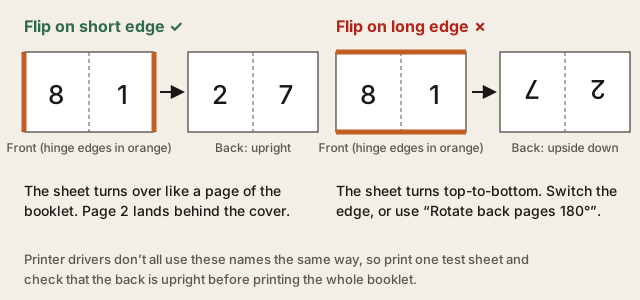
Each sheet has four page positions: front left, front right, back left, back right. For eight pages, the outer sheet carries 8 beside 1 on the front and 2 beside 7 on the back; the inner sheet carries 6 beside 3 and 4 beside 5. You print double-sided (flip on the short edge for these landscape sheets), fold the stack once, and staple along the fold. Page 1 becomes the cover automatically because it sits on the front right of the outer sheet.

Blank pages, bleed, gutter, and creep
If the page count is not a multiple of four, blank pages are added at the end until it is. Blank pages already in your PDF stay where they are; they count as real pages. Bleed is a number you type if your design extends past the page edge; the tool doesn’t look for printer’s marks in the file. Gutter adds space on the fold side of every page, and creep shifts the inner sheets toward the fold for thicker booklets.
Paper size and export quality
Auto paper keeps your pages at their original size and places two side by side. If that sheet is too big for a home printer, pick A4 or Letter landscape and the pages are scaled to fit. Pages of mixed sizes are fitted inside the first page’s size by default. The standard export keeps text and vector graphics sharp. If a page can’t be copied that way, it is converted to a 300 ppi image. The smaller “preview quality” export uses lower-resolution images and suits quick proofs.
The tool handles page layout only. It doesn’t change colors, and it doesn’t merge, split, or compress PDFs. When you are ready, load a file above or try the 8-page sample, then check the print settings under Export.
Test duplex orientation before printing the full booklet
Use a single imposed sheet to identify the correct duplex edge. In the print dialog, choose Actual size/100%, select one sheet or a short range, and turn off any booklet, brochure, or “booklet creation” option.
Is the imposed sheet landscape, with two portrait pages side by side?
- Yes → start with Flip on short edge. Mark the top edge of the front, print one sheet, and turn it over like a page of the booklet. The reverse should be upright, with its top at the same edge as the front’s.
- No, or the sheet is a custom orientation → use the same marked-sheet test. Pick the edge that keeps the reverse upright after the turn. If short edge makes the reverse upside down, retry with long edge.
- The reverse is upright but the page order is wrong → check that the PDF is already imposed and that printer booklet mode is off. Edge flipping fixes orientation, not an incorrectly imposed page map.
- The reverse is the right way up but scaled → return to Actual size/100% and disable “Fit,” “Shrink,” or “Scale to printable area” before testing again.
Keep the successful edge setting for the full run. A printer driver may describe the same physical action differently, so the marked sheet is the authority.
Saddle-stitch imposition FAQ
Can I print an imposed PDF with my printer’s booklet setting?
No. Booklet Imposer has already placed reader pages into sheet order. Print the exported PDF as ordinary pages, at Actual size/100%, with duplex enabled and booklet/brochure mode disabled. A second imposition pass can scramble the page order.
Why are some slots blank when the source looks complete?
Saddle stitch uses four slots per sheet. The tool pads the end to a multiple of four so every fold has a matching front and back. Those trailing blanks are expected; source blanks are preserved as intentional reader pages.
What should I inspect on the first folded proof?
Check the cover, the center spread, page-number direction, and the outer-to-inner nesting. If page order is correct but inner trim margins drift, review PDF booklet creep compensation rather than changing the page map. The 16-page booklet example shows the sheet sequence in a concrete case.
Load a PDF and check the sheets
Upload a PDF to preview Sheets, Reader, and Spreads. Print one marked duplex test sheet before committing the whole stack; once orientation, scale, and fold order pass, use the same settings for the final export.
Start with zine printing imposition for short-run and mini-zine workflows. For a controlled inner-sheet shift, use PDF booklet creep compensation. Then follow how to print a booklet at the printer.